


USA Quiz
4.898.00 Reviews
App Specs
- Version
- 1.17.5
- Updated On
- License
- Free
- Downloads
- 100,000+
- Developer
- Qbis Studio
- Categories
- Trivia
- Platform
- Android
Screenshots
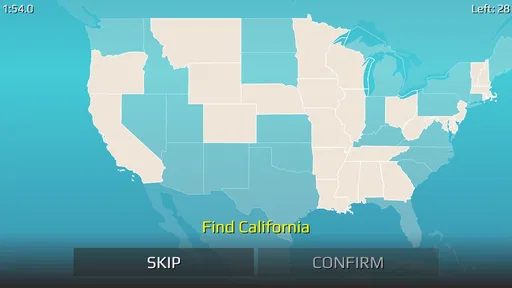

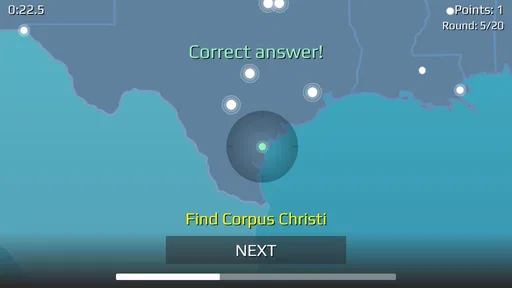
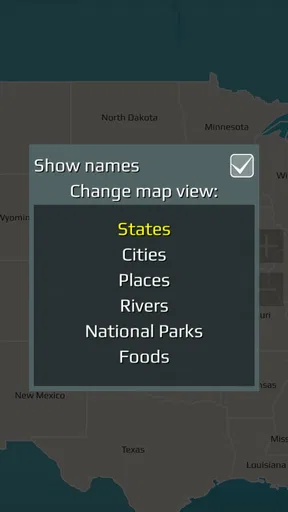
 Analysis by AppCompare
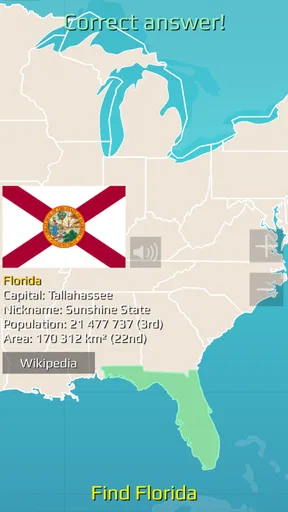
On a shared phone, a quick trivia game can turn an ordinary pause into a friendly challenge: one person tries to name a state capital, someone else remembers a famous place, and the conversation goes on even after the screen is put down. That is the kind of low-effort use I can see for USA Quiz. It is a free trivia game from Qbis Studio, built around U.S. states and related facts, so it suits a household that enjoys short rounds of general-knowledge questions more than a sprawling game with a long setup.
A quiz that can work around a shared screen
I would treat this as a casual pass-the-phone activity rather than assume it has a dedicated family or party mode. A parent, child, or visiting relative can take a turn answering, then hand the device over, keeping the rules simple: say your answer before tapping, and let the next person try if you miss. That small change makes multiple-choice questions more social and gives younger players time to think without turning every round into a race.
It can also fit a quiet wait at a restaurant or a few minutes before leaving the house. Instead of asking everyone to commit to a long session, try a short burst and stop when attention wanders. The subject gives people natural prompts to discuss—whether they have visited a place or can recall a capital—so the game can be a starting point for conversation, not just a score chase.
Keep expectations clear on a household device
If several people use one phone or tablet, decide whose progress or choices are being used before starting. I would not treat a shared device as a way to keep separate household profiles; the practical approach is to take turns and avoid making assumptions about whose personal game history or standing is being shown. That boundary matters most when a child is using a device that an adult also uses.
The game is free to download, with optional in-app purchases listed at $2.99–$7.99 per item. For a shared device, I would check purchase settings on the device itself and make sure everyone knows that a free download can still present paid options. That is sensible housekeeping for any game, especially when younger family members can tap through screens quickly.
Choosing the right pace and age context
Its Everyone age rating makes it a reasonable candidate for a mixed-age household, but that label is not a promise that every question will suit every player’s knowledge. A child who is still learning U.S. geography may need an adult to explain why an answer is correct or to turn a miss into a quick lesson. Older players may prefer to keep score verbally, since the fun of a shared round does not depend on everyone having their own account or device.
The timer described in play changes the feel of a round: it rewards quick recall, which can be exciting for confident players but frustrating for someone who needs longer to read and consider the choices. When playing together, I would agree to let the slower reader finish before the group moves on, or make the goal learning rather than winning. If speed is the main source of stress, this is probably not the best choice for that particular session.
Worth Reading Before You Choose

EA SPORTS FC Mobile 26 Is a Bigger Football Game, but It Takes Time

Flipboard Shows What News Apps Must Do Beyond the Feed

Switching to Android Auto Means Rethinking Your Driving Routine

Google Calendar Makes a Crowded Week Easier to Manage

Ludo King Makes the Most of the Minutes Between Plans

Baby Panda World Brings Quick Play to Modern Phones, but Its Game Library Feels Busy
What the household gets—and what it does not
For an uncomplicated shared activity, the appeal is its narrow, recognizable subject and quick trivia format. It is less suitable if your household wants a collaborative puzzle, a broad range of themes, or a game designed around team play. The choice is between a focused U.S.-geography quiz and a more flexible party game; neither is automatically better, but they serve different moods.
Qbis Studio’s game has an average rating of 4.8 from around 1.6 thousand ratings, and it has passed 100 thousand installs. Those figures suggest that plenty of players have tried it, but they do not tell me whether its pace or question style will work for your family. I would start with a few rounds and see whether people enjoy recalling facts, rather than downloading it expecting a full household game-night system.
It is also worth distinguishing quick recognition from lasting learning. Multiple-choice options can help a player narrow down an answer, but a correct tap does not necessarily mean they can recall that fact later without prompts. A useful household habit is to ask everyone to name the answer aloud before revealing it, then revisit a missed question in conversation. That takes no extra setup and makes the session feel less like guessing.
Ever found yourself watching a game show on TV and thought, "I could totally nail these questions"? Well, with the USA Quiz app, you can put your trivia skills to the test right from your phone. I recently downloaded this little gem and took it for a spin, and let me tell you, it's as addictive as that bag of chips you can't stop munching on.
Getting Started with USA Quiz
First things first, downloading the USA Quiz app is a breeze. A quick search on the app store, a tap, and voila, you’re ready to dive into a world of trivia goodness. The interface is straightforward and welcoming, not overloaded with unnecessary frills. It feels like sliding into your favorite pair of jeans—comfortable and just right.
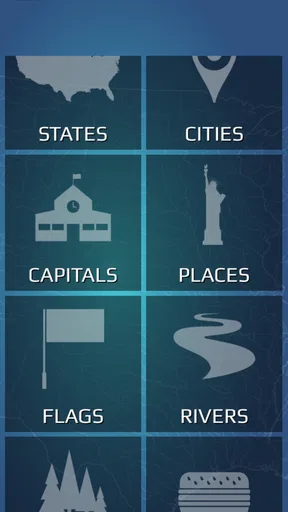
Once you're in, the app greets you with a variety of quiz categories. Whether you’re a history buff, a geography geek, or someone who just loves random facts, there’s something here for everyone. I found myself gravitating towards the history section, but hey, that’s just my inner nerd talking.
The Gameplay Experience
Diving into the quizzes, the questions range from "Oh, I know this!" to "Wait, what?"—a perfect blend that keeps you on your toes. It’s like a mental workout, but fun. You get multiple-choice questions, and let me tell you, some of those options are sneaky. If you’re not careful, you might just second-guess yourself. But isn’t that part of the thrill?
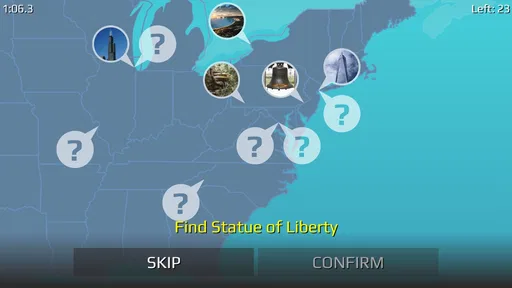
The app also features a timer, adding a bit of pressure to the mix. It’s not just about knowing the answer; it’s about thinking fast. I caught myself racing against the clock, my heart doing a little victory dance every time I got a question right. It’s exhilarating!
Features That Shine
One of the standout features of the app is its leaderboard. Competing against friends or even strangers adds a competitive edge that keeps you coming back for more. Climbing up the ranks feels as rewarding as finding a forgotten $20 bill in your pocket.
The app also regularly updates its question bank, meaning you’re always getting fresh content. Just when you think you’ve mastered a category, boom, new questions appear. It keeps the experience exciting and unpredictable, much like a plot twist in your favorite thriller novel.
Room for Improvement
As much as I enjoyed the app, there are a few areas that could use a little polish. For starters, the ads. They’re like that one song on repeat that you can’t get out of your head. A bit too frequent for my taste, but hey, that’s the trade-off for a free app, right?
Also, while the app is generally smooth, I did face a couple of glitches. Nothing too major, just the odd freeze or lag here and there. Hopefully, future updates will iron these out, ensuring a seamless experience for all trivia lovers.
Room for Improvement in a Study Routine
For someone using the game to brush up on U.S. geography, I would keep sessions short and deliberate rather than replaying the same material until the answers feel familiar. Try pausing after a round and recalling the missed fact without looking at the choices. If it still does not come to mind, that is a better signal to review than a score alone. The timer makes this less like a reference tool and more like a quick self-test, so a textbook or map remains a better companion when accuracy and explanation matter more than pace.
The game’s subject is also a clear boundary. It may be a pleasant fit for a road-trip break when the group is already talking about places in the United States, but it is not a general knowledge library for someone who wants science, world history, or a wide mix of quiz subjects. I would choose a broader trivia app if variety is the main goal, and a map-based learning resource if someone needs a structured lesson rather than a challenge.
Practical details before installing
The game is free, though in-app purchases range from $2.99 to $7.99 per item. That makes it easy to try without paying upfront, while still worth explaining to children before they explore any purchase screens. It is rated for Everyone and requires Android 6.0 or later; its current version is 1.17.4. The game was released on March 31, 2020, so it is not a brand-new title, but the version information gives Android users a concrete compatibility point to check against their device.
One question people often have is whether the timer makes it unsuitable for a beginner. I would not rule it out: a new player can still use the choices to reason through an answer, but the countdown means a relaxed learner may enjoy it more when nobody is watching the clock or comparing scores. Another practical question is whether it works as a no-pressure family activity. It can, if players agree to take turns and keep the goal light; its competitive elements are better left aside when ages or knowledge levels differ a lot.
For a commute or solo break, I would use it as a quick distraction rather than expect a deep, uninterrupted study session. For a household, I would bring it out when people are willing to trade turns, not as a substitute for a cooperative game where everyone solves the same puzzle together. The distinction sounds small, but it helps set expectations: this is trivia practice with a competitive streak, not a family organizer or a teaching plan.
Wrapping It Up
All in all, the USA Quiz app is a delightful way to pass the time while flexing those brain muscles. It’s engaging, educational, and just the right amount of challenging. Whether you’re a trivia enthusiast or just looking for something fun to do on your commute, this app is worth a spot on your home screen.
So, what are you waiting for? Grab your phone, download the USA Quiz, and see how you stack up against the rest of the country. Who knows, you might just learn a thing or two along the way. Happy quizzing!
My household verdict
I would recommend it to a home that enjoys quick geography questions and can treat a wrong answer as part of the fun. It is a particularly easy option for a short shared turn because there is no elaborate premise to explain: open the quiz, answer, and talk about what surprised you. The 4.8 average is encouraging, but your best test is whether the family likes timed multiple-choice trivia.
I would skip it for a household looking for rich account separation, cooperative team rounds, or a broad educational course. It is also not my pick for a player who dislikes countdown pressure or wants every answer explained in depth. For everyone else, especially people who enjoy U.S. place-based trivia in small doses, it is a friendly, low-commitment game to keep handy.
Pros
- Engaging and educational content.
- User-friendly interface.
- Regular updates with new questions.
- Variety of difficulty levels.
- Interactive learning experience.
Cons
- Limited offline functionality.
- Ads can be intrusive.
- Requires internet for full features.
- Occasional question repetition.
- No multiplayer mode.
FAQs for USA Quiz
What is USA Quiz and how does it work?
USA Quiz is an engaging trivia app designed to test your knowledge of American history, geography, culture, and more. It features various levels of difficulty and offers multiple-choice questions. As you progress, you earn points and unlock new quizzes. It's a fun way to learn and challenge yourself on all things related to the USA.
Is USA Quiz available for both Android and iOS devices?
Yes, USA Quiz is available for download on both Android and iOS platforms. You can find it on the Google Play Store for Android users and the Apple App Store for iOS users. The app is designed to provide a seamless experience on both types of devices, ensuring all users can enjoy the quizzes.
Does USA Quiz require an internet connection to play?
USA Quiz can be played both online and offline. While an internet connection enhances the experience by allowing access to real-time leaderboards and updates, you can still enjoy most of the quizzes offline. This makes it a convenient option for users who may not always have internet access.
Are there any in-app purchases or advertisements in USA Quiz?
USA Quiz includes both free content and optional in-app purchases. These purchases can unlock additional quiz packs or remove advertisements for an uninterrupted experience. Advertisements are present in the free version, but they are designed to be unobtrusive, allowing you to enjoy the game without excessive interruptions.
Is USA Quiz suitable for all age groups?
USA Quiz is designed to be family-friendly and suitable for all age groups. The questions range from easy to challenging, catering to both younger players and adults. It’s an educational tool that can help users of all ages enhance their knowledge of the United States in a fun and interactive way.


